 Quotes
 Invoicing
 Collections
 Recruiter
 Accounts payable
 Order intake
 Bookkeeping
 Scheduling
 Caregiver matching
 Crew dispatch
 Daily summary
Workflows
Software for the work your team does by hand.
We build custom tools, like quoting or accounts receivable software, around how your team already works. Add AI agents to do the repetitive steps, or don’t. It’s your call.
 QuickBooks
 ADP
 Paychex
 ServiceTitan
 Jobber
Step 1 · Customer examples
Running at real businesses today.
Five tools we built and run. Open one to see the screens, what it replaced, and what changed.
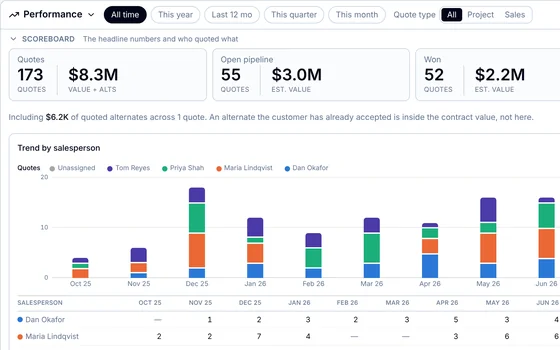 Tool + AI assistantQuoting and proposalsPrice jobs, write the contract, follow up until it’s wonBuilt for: A manufacturer and installerSee the example
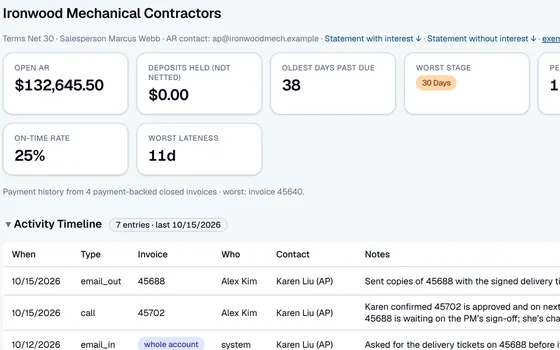 Tool onlyAccounts receivableEvery invoice, call, and promise to pay in one placeBuilt for: A manufacturer and installerSee the example
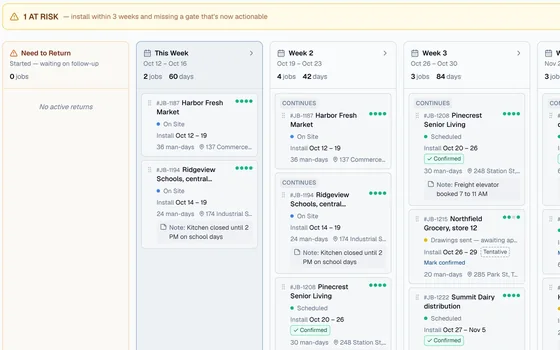 Tool + AI agentsScheduling and dispatchJobs, crews, and dates on one boardBuilt for: A manufacturer and installerSee the example
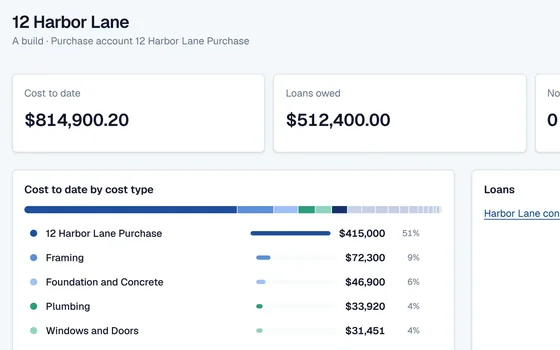 Tool + AI agentBookkeeping and job costingEvery cost coded to the right jobBuilt for: A residential developerSee the example
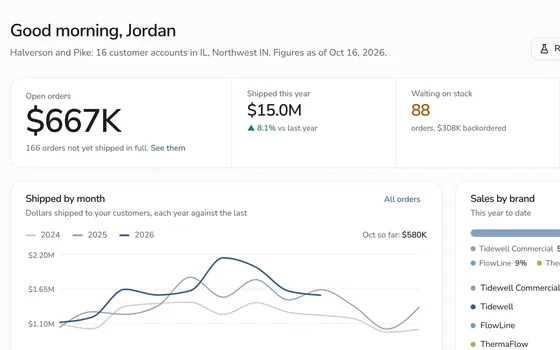 Tool onlySales and customer portalsOrders, stock, and commission for reps and buyersBuilt for: A manufacturer with a network of sales repsSee the example
- Don’t see yours?Step 2 lists 25 workflows we build. If your team does it by hand, we can build the tool for it.Find your workflow
Step 2 · Everything we build
Find the work your team still does by hand.
Pick your industry to narrow the list. Each tool is shaped around how your team works.
Your industry
Win the work
From the first call to a signed job.
- Real exampleQuotes and estimatesPrice jobs from your price book, send a clean proposal, and follow up until it’s won.See it running
- Estimates from a site visitWalk the job with a phone. Photos, measurements, and notes become a priced estimate before you leave the driveway.
- Lead intake and follow-upCalls, web forms, and texts land in one list, go to the right person, and nobody forgets to call back.
- Change ordersExtra work gets written up, priced, signed by the customer, and added to the final bill, instead of lost in a text.
Run the work
Jobs, crews, sites, and the paperwork in between.
- Real exampleScheduling and dispatchJobs, crews, trucks, and dates on one board, with conflicts flagged before they cost you a day.See it running
- Shift scheduling and call-out coverBuild the week’s shifts, see who’s available and qualified, and fill a call-out in minutes, not hours.
- Work orders and service ticketsEvery request becomes a ticket with photos, parts, and status, from the first call to closed out.
- Checklists and inspectionsRoom-by-room or site-by-site checklists with photo proof, so you can show the client exactly what was done.
- Daily reports and job logsCrews log hours, progress, and photos from the site, and the office sees every job without driving out.
- Restoration job filesMoisture readings, photos, equipment, and drying days in one file per job, ready for the insurance adjuster.
- Housekeeping and room statusWhich rooms are dirty, clean, or inspected, who’s on which floor, and what maintenance is waiting.
- Client intake and care plansNew clients, their care plans, and visit notes in one place, shared with the caregivers who need them.
- Equipment and fleet upkeepTrucks, tools, and equipment with service dates, who has what, and what’s due for maintenance.
Your team
Hiring, hours, and the paperwork that follows people.
- Timesheets and payroll prepHours from the field, checked against the schedule, with overtime flagged and a file ready for payroll.
- Hiring and onboardingApplicants screened, new hires signed and trained, and the paperwork done before day one.
- Licenses and certificationsEvery license, certification, and background check with its expiry date, and a heads-up before one lapses.
Get paid and keep the books
Invoices out, bills in, and every dollar on the right job.
- Invoicing from finished workFinished jobs and visits turn into accurate invoices, with the hours and materials already on them.
- Real exampleAccounts receivable and collectionsEvery invoice, call, and promise to pay on one timeline, with reminders drafted for your OK.See it running
- Purchase orders and vendor billsOrders to suppliers, bills matched to what actually arrived, and payments lined up by due date.
- Real exampleBookkeeping and job costingEvery cost coded to the right job or location, so you know what each one really made.See it running
- Maintenance plans and membershipsRecurring plans and memberships that bill on schedule and book the next visit on their own.
Customers and stock
Bookings, orders, shelves, and keeping customers coming back.
- Online booking and remindersCustomers pick a time, get reminders by text, and fewer appointments are missed, from car washes to pet grooming.
- Inventory and reorderingStock counts you can trust across locations, and reorders drafted before a shelf runs empty, from pet supplies to parts.
- Real exampleSales and customer portalsOne place where customers or reps place orders, check status, and see what’s in stock.See it running
- Customer follow-up and reviewsA thank-you after every job, a quick survey, and a review request to the happy customers.
Step 3 · AI agents, if you want them
Agents that do the repetitive steps.
An agent takes one job, like chasing invoices, entering orders, or matching bills. Deploy it inside a tool we build for you, or on top of the software you already run. You decide how much it does on its own, and a person approves anything that matters.
Pick what fits
Three ways to work with us
The two layers are separate services. Start with one, add the other later, or build them together from day one.
- Option 1A custom tool, no AISoftware built for one job and the way your team does it. Your team works in it; nothing is automated unless you want it to be.Accounts receivable for a manufacturer
- Option 2A custom tool with AI agentsThe tool holds the work, and agents do the repetitive steps inside it. Together they make one agentic workflow, with your team approving what matters.Install scheduling with AI agents
- Option 3AI agents on your current softwareKeep the software you have. Agents work on top of it, like matching bills in your accounting system or entering orders from email.Meet the agents
Not sure which you need? That’s what the first call is for.
We look at the software you use and the work your team does by hand, then tell you whether a tool, agents, or both would help most.